


Mike’s last two issues were about what you put in front of the agent. The spec it builds from, and the tests that define done. This one is about what it costs to run the agent at all, now that the tokens have a budget.
For most of the last year, AI tools at work felt unlimited. You opened a session, worked as long as you wanted, and nobody looked at the token count. That is changing. More and more companies now give teams and people a token allowance, and the allowances are getting smaller as usage grows.
I think that is a reasonable thing for a company to do. When usage triples in a few months and nobody can say what it bought, a limit is the obvious first move. The question for engineers and leaders is what comes next. If your tokens are going to be limited, how do you get the most out of each one?
The timing matters. Most of us are in budget season now. OKRs for next year are being drafted and committed in the next few weeks. Whatever you plan for AI now is what you work with for the next year, so this is the time to get it right.
Below: where tokens actually go, a quick self-check, six habits that stretch every token, what leaders can set up so the efficient path is the default, and a four-week plan to have ready before your numbers lock.
Tokens are the new budget line
This is happening across the industry, not at one or two companies. A few examples from public reporting:
Accenture now funds a set amount of Claude use per person centrally, about $29 a month. Use beyond that is charged to project budgets. It took effect October 1. (TNW)
Uber reportedly used its full-year AI coding budget in four months, then capped spend at $1,500 per person, per tool, per month. (Unite.AI)
Microsoft set AI budgets for its divisions in August, and Atlassian engineers now work to an AI budget too, according to the same TNW report.
The pressure behind it is real. Jellyfish, which sells engineering analytics, found AI spend per engineer tripled between March and August (Jellyfish).
So I would plan on two things. Allowances will keep tightening, not loosening. And the teams that get the most done inside an allowance will be the ones that understand where their tokens go.
Where your tokens actually go
Try this once. Open a coding agent in a large repo, type “hello” or “take a look at the repo,” and check the usage when it finishes. Most people are surprised by the number.
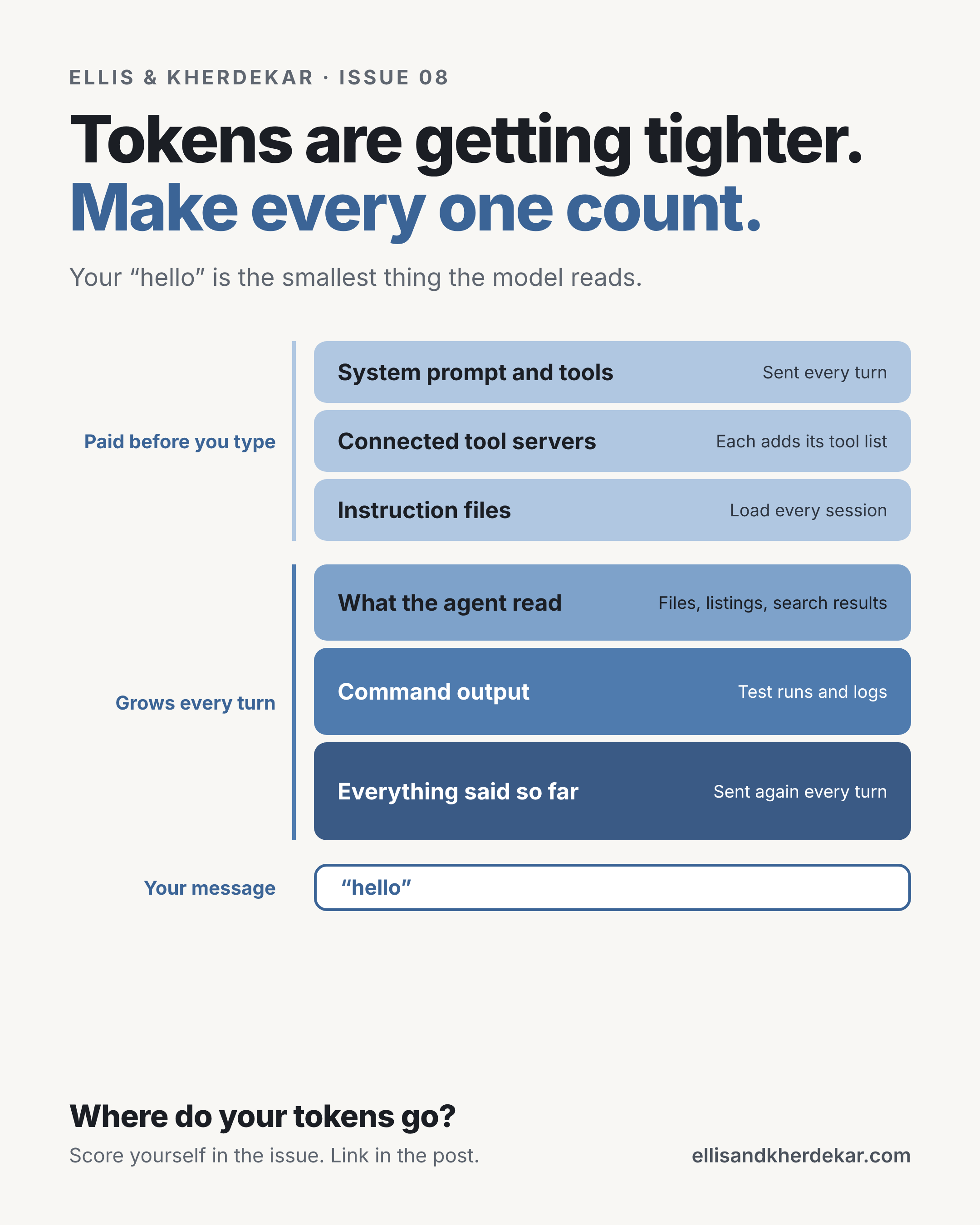
The reason is that the model never sees just your message. On every turn it receives a stack of context, and most of that stack is sent again on the next turn. That stack is the picture at the top of this issue.
Three things follow from it.
You pay a fixed amount before you type anything. The tool’s own instructions, the definitions of every connected tool, and any instruction files in the repo ride along on every turn. The more you have switched on, the bigger this is.
The growing rows are where most of the waste is. “Take a look at the repo” invites the agent to list folders and open files. A full test run dumps hundreds of lines. All of it stays in the conversation and gets sent again each turn. By the third or fourth turn, history is often the biggest row.
Less context is often better, not just cheaper. Anthropic’s guide to context engineering says model accuracy tends to drop as the context fills up, and recommends the smallest set of useful information that gets the job done (Anthropic). Meta wrote on Oct 19 that one agent loaded with everything started hallucinating in production, so it split the work across 14 narrow agents that each see only their own part (PPC Land).
So the goal is not to use AI less. It is to send each turn only what it needs.
Score your token habits
Score yourself 1 to 3 on each row. Engineers score their own work. Leaders score the team, then compare with what the team says.
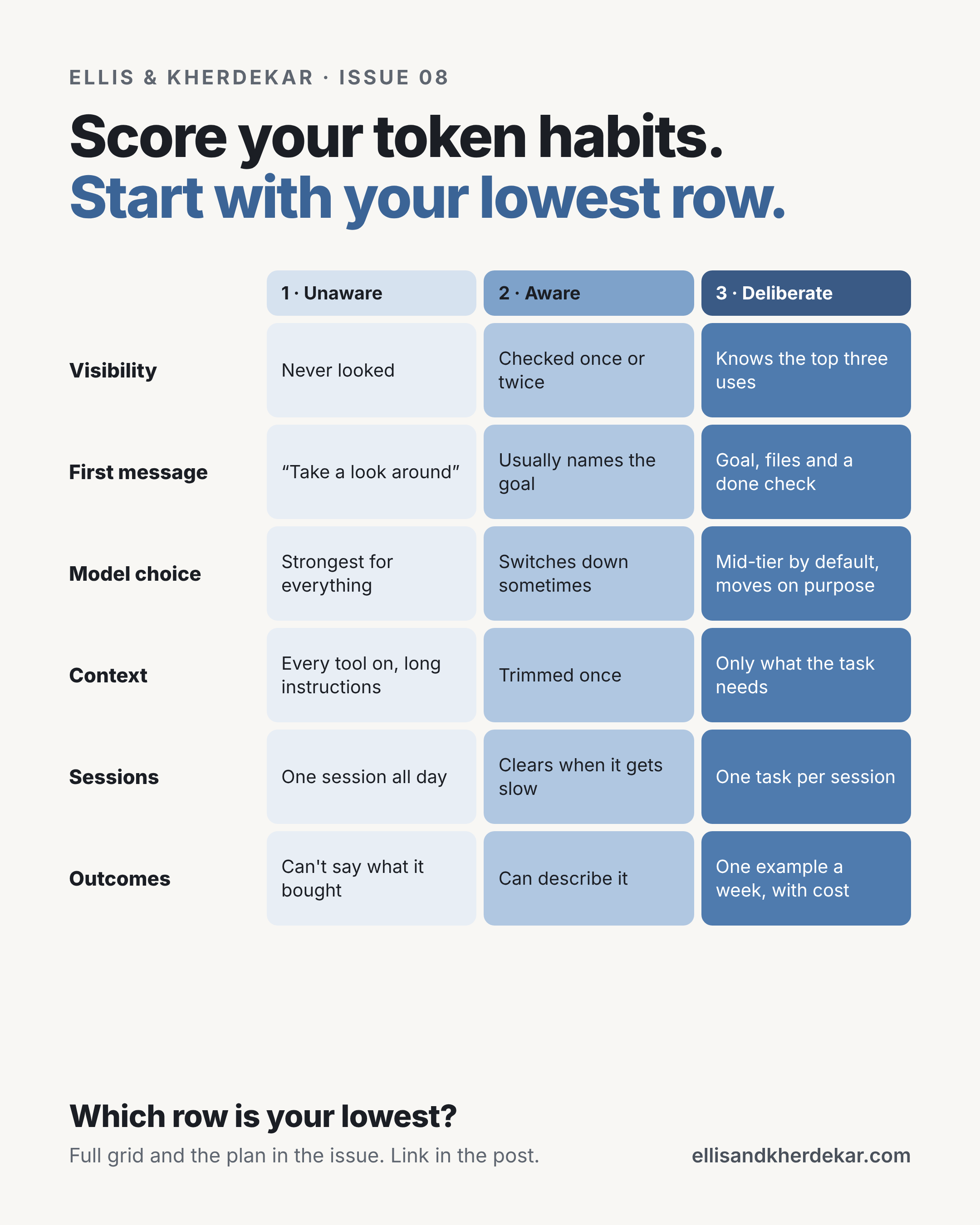
A 3 only counts if you can show the evidence:
Visibility: last week’s usage, split by task.
First message: three recent first messages.
Model choice: you can name what each tier is for.
Context: the setup in your repo.
Sessions: session count per task.
Outcomes: a short monthly note on what your tokens bought.
How I’d use it:
Score it alone first. It takes five minutes.
Ask a teammate or your lead to score you separately. The gaps are the useful part.
Pick your lowest row. That is where the next four weeks start.
Score again before your budget or planning meeting.
If you are not sure where to start, Sessions and First message are usually the quickest wins. They cost nothing to change.
Six habits that make every token count
For engineers · Goal: the same work, done with fewer tokens · Costs you: about a week of new habits
None of these slow you down once they are habits. Most of them make the agent better, because it is working with less noise.
1. Start with the goal and the files
The first message decides most of what the session costs. A vague ask makes the agent explore. A specific one lets it go straight to the work.
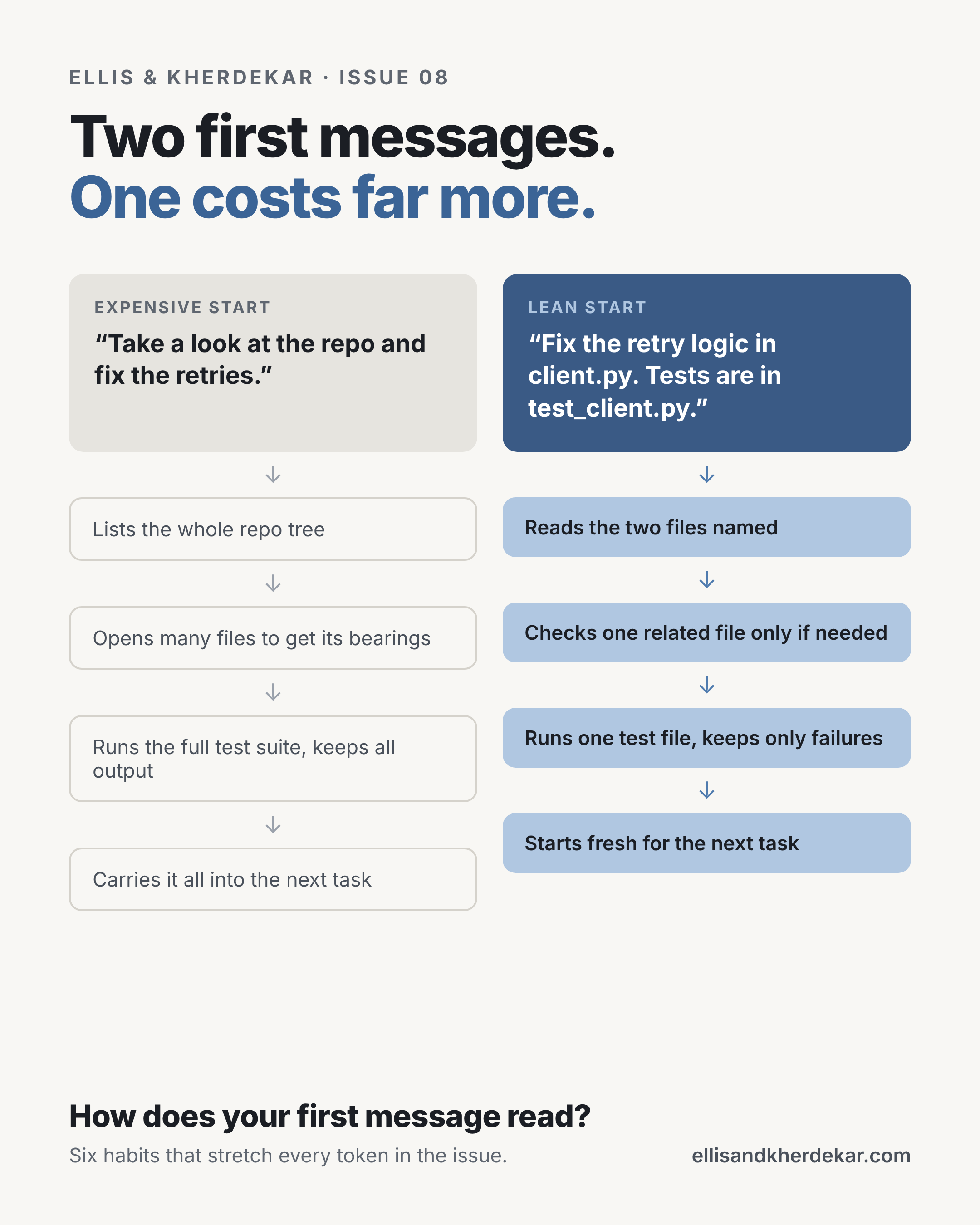
Name the files, the test, and what done looks like. If you don’t know which files matter, ask the agent for a short plan of where it would look first, check it, and then let it go.
2. Pick the model for the task
Two questions decide most of it. Is the task routine? Is it new, risky or hard to undo?
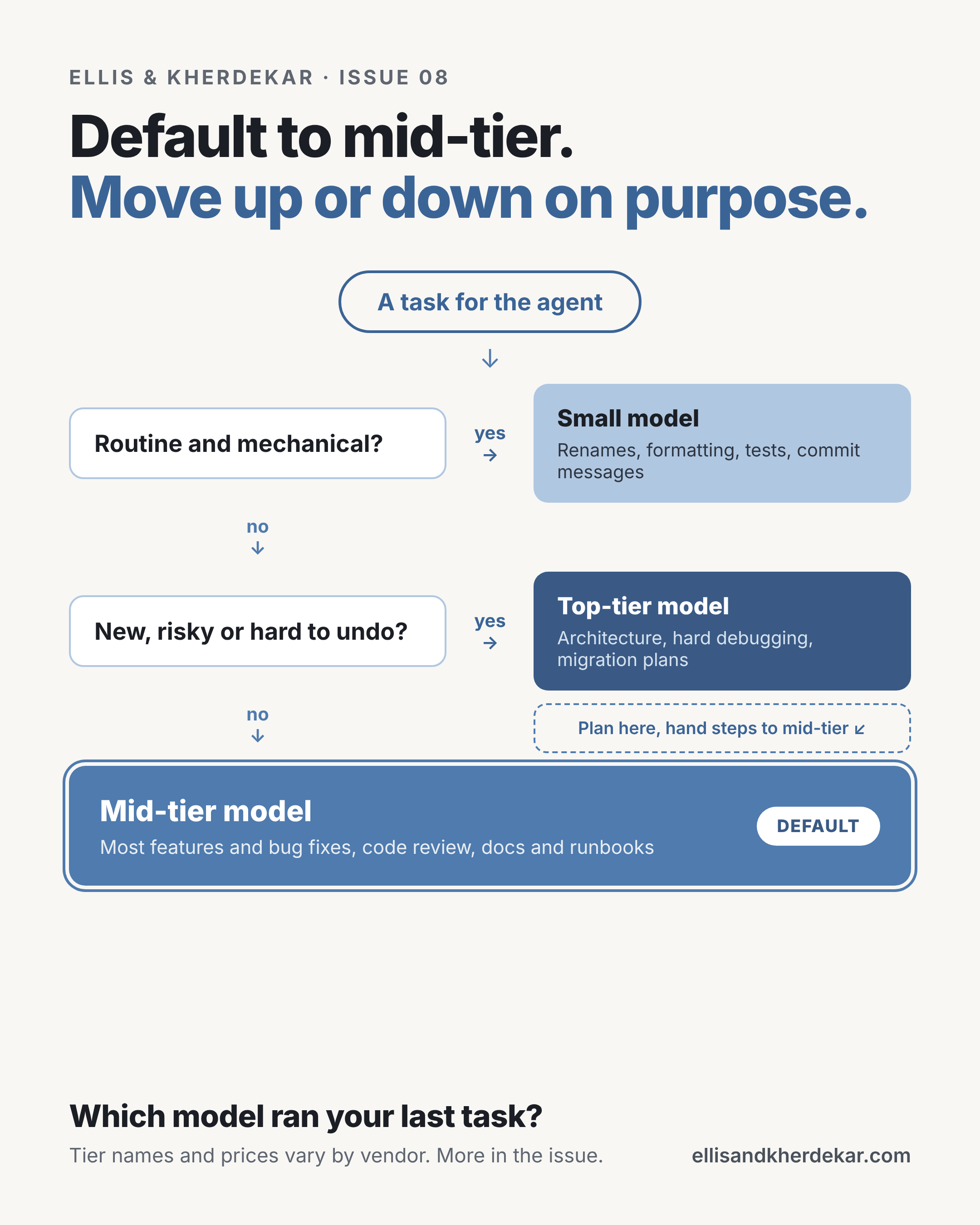
The dashed box is the habit that saves the most on big jobs. Use the top tier to think through the plan once and write it to a file. Then start a fresh session on a mid-tier model that reads only the plan and does the steps. Tier names and prices differ by vendor and change often, so learn what your tools offer and how to switch.
3. Load context just in time
A long instruction file is sent with every message, even when most of it has nothing to do with the task. Keep the shared file short: how to build, how to test, the conventions that matter. Put workflow instructions, like how to run a migration or review a PR, in separate notes or skills that load only when that workflow comes up.
4. Keep noise out of the conversation
Turn off what you don’t need. Every connected tool server adds to the fixed cost of every turn. Where a command line tool does the job, it is usually lighter. Set your tools up before you start, because changing them mid-session can throw away the cache.
Filter output before it lands. A full log or test run goes into context and gets sent again every turn after. A small script that returns only the failures or the error lines turns thousands of lines into a handful.
Push noisy work to a sub-agent. Searching docs, reading logs or running broad tests can happen in a separate agent with its own context. It hands back a short summary and your main session stays small.
5. One task, one session
History is sent again on every turn. A one-line question in a session that has been open all day still pays for the whole day. Clear between unrelated tasks. When a session gets long, ask the agent for a short summary of where things stand, save it, and start fresh from that note.
6. Stop failed loops early
If the agent has failed the same thing three times, more retries usually burn tokens without getting closer. Stop. Work out what it is missing and give it that, or do that part yourself.
Check the meter. Most coding agents can show what is filling the context and what a session used. Look after each task for one week. You will find your own “hello” moments quickly.
Stuck signal: your sessions get slower and less accurate as the day goes on. That is usually history, not the model.
What leaders can set so every token goes further
For leaders · Goal: make the efficient path the default path · Costs you: a few decisions and some platform time
The six habits work much better when people don’t have to set them up alone. The companies furthest along put a thin platform layer between their engineers and the models, so the cheap path is also the easy one.
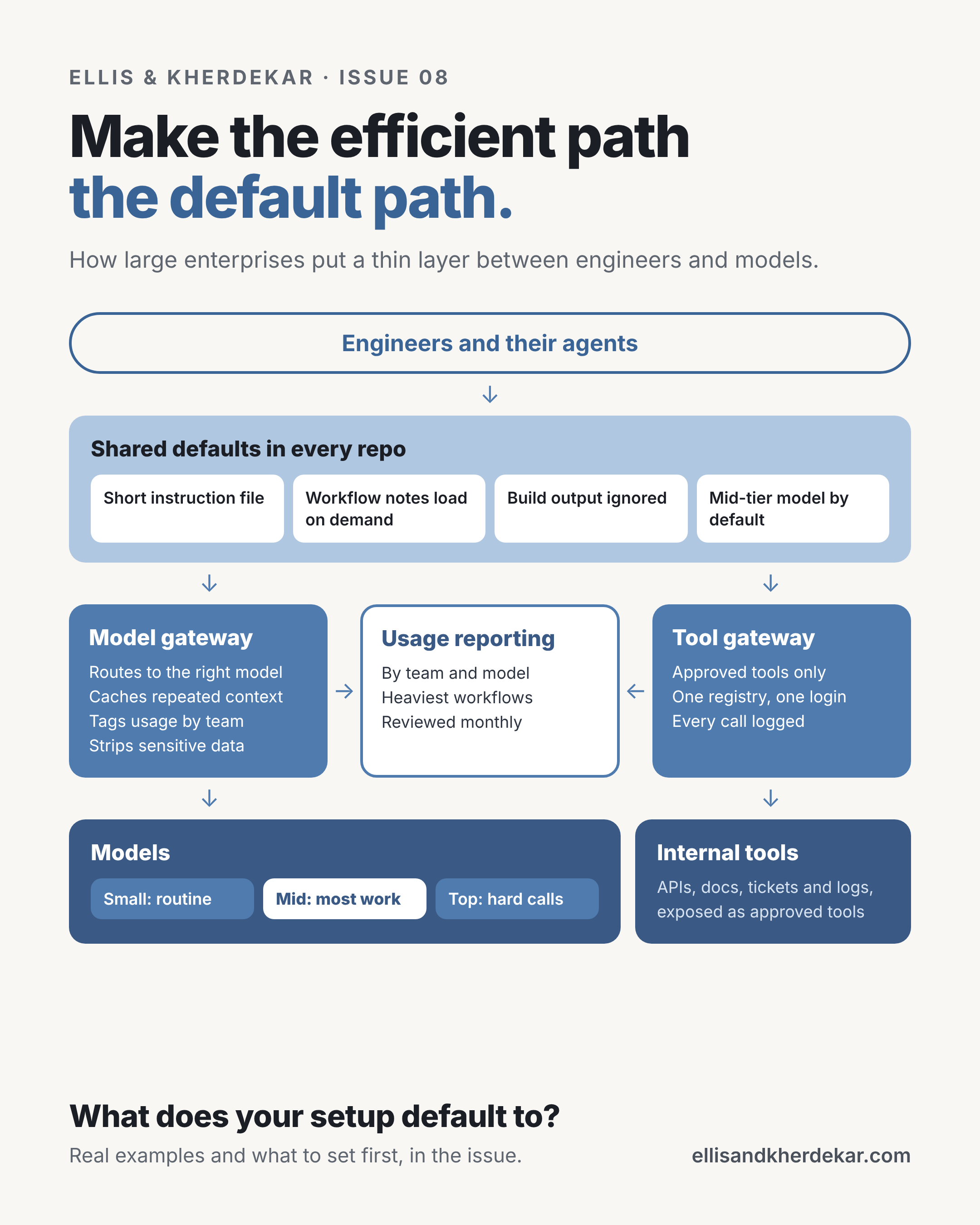
What the public examples show:
One gateway for model calls. Uber built an internal gateway that every model call goes through. It handles access, caching, monitoring and removing sensitive data before a request leaves the company (Codingscape write-up, drawing on Uber’s engineering blog). Goldman Sachs reportedly runs a central gateway that classifies each request by type of task and routes it to the most cost-effective model (Unite.AI).
One gateway for tools. Uber added a second gateway for the tools agents call, with one registry of tool servers and central logging of the calls. The order matters: the same write-up describes building the gateway first, then scaling agents, then tuning cost. Adding governance afterwards is the harder path.
Narrow agents over one big one. Meta’s thin orchestrator, described above, is the production version of habit 3. Each agent loads only the knowledge it needs.
What I would set, in order:
Mid-tier as the default model. Most work lands there anyway, and the top tier stays one switch away. Set it in org-wide or managed settings, not by asking people.
A repo starter kit. Every repo starts lean instead of every engineer tuning their own setup. A short instruction file, shared workflow notes, ignore rules for build output, and a script that trims test output.
A curated tool list. Fewer, better tools per repo means less fixed cost on every turn and fewer wrong tool calls. List the tool servers people actually use and agree on a short set per repo.
Spend visible by team. You can only stretch what you can see. Use your vendor’s usage reporting, or a gateway if you have one. Tag by team and type of work.
A monthly look at the heaviest workflows. Waste is easiest to fix while it is small. Pick the three most expensive workflows each month and ask whether they needed to be.
Teach it. A 30-minute session where your most efficient engineer walks through their setup goes a long way.
The trade-off. Defaults take away some freedom, and your heaviest users will notice first. Talk to them before you change anything. Often they are doing the most valuable work, and the right answer is a bigger allowance for that work, not a smaller one for everyone. Keep incident and production work fully funded no matter what the allowance is.
Stuck signal: the allowance is the only lever you have. If every conversation about tokens is about the limit, the setup above is missing.
Show what your tokens bought
For both · Goal: connect tokens to outcomes before your numbers lock · Artifact: one page on what AI delivered this quarter
Stretching tokens is half the job. The other half is being able to say what they produced. When planning comes around, a team that can show that is having a very different conversation from a team that can only show a usage total.
Pick one or two measures, and pair them. Tokens per merged change, per incident resolved or per feature shipped are all reasonable. Any one of them alone can be gamed. Tokens per merged change goes down nicely if people split changes into smaller pieces. So pair each one with a delivery or quality measure your team already tracks, and look at the team trend, never at individuals.
Put it in your OKRs. Set the numbers from your own baseline.
Objective: Get more delivery from every token.
Usage visible by team and type of work by end of Q1.
Tokens per merged change down from the Q4 baseline by a target you set, with delivery and quality flat or better.
Mid-tier model is the default for most routine work.
No incident or production fix slowed by a token limit.
For individual engineers, these work as growth goals:
Can show what my AI use bought each month, with one example.
Uses the right model for the task and can say why.
Shares one token-saving habit with the team each quarter.
Leave out anything that counts prompts or tokens used as a goal on its own. Rewarding usage gets you more usage.
Have answers ready for planning. Whoever owns the budget will likely ask some version of these. They are fair questions, and having answers ready makes the conversation a lot shorter.
Where are the tokens going? A weak answer is “across the team, mostly coding.” A strong one is usage by team and type of work, with the top three uses named.
What did we get for them? A weak answer is “people are more productive.” A strong one is delivery and quality next to usage, quarter over quarter, with two or three real examples.
What if the allowance is 30% smaller? A weak answer is “everything slows down.” A strong one is what we protect, what we stop, and which dates would move.
Why would next year need more? A weak answer is “usage is growing.” A strong one is which work is growing, why it is worth it, and how tokens per outcome are coming down.
The scenario question is the one to prepare most carefully. Decide now what you would protect at a flat allowance, at 30% less and at 50% less. Incident and production work should be protected at every level.
Your next four weeks
Most of us have weeks, not months, before next year’s numbers are set. Four weeks is enough to know where your tokens go, stretch them, and walk into planning with a clear story. Leaders and engineers run it side by side, and each step ends with a gate.
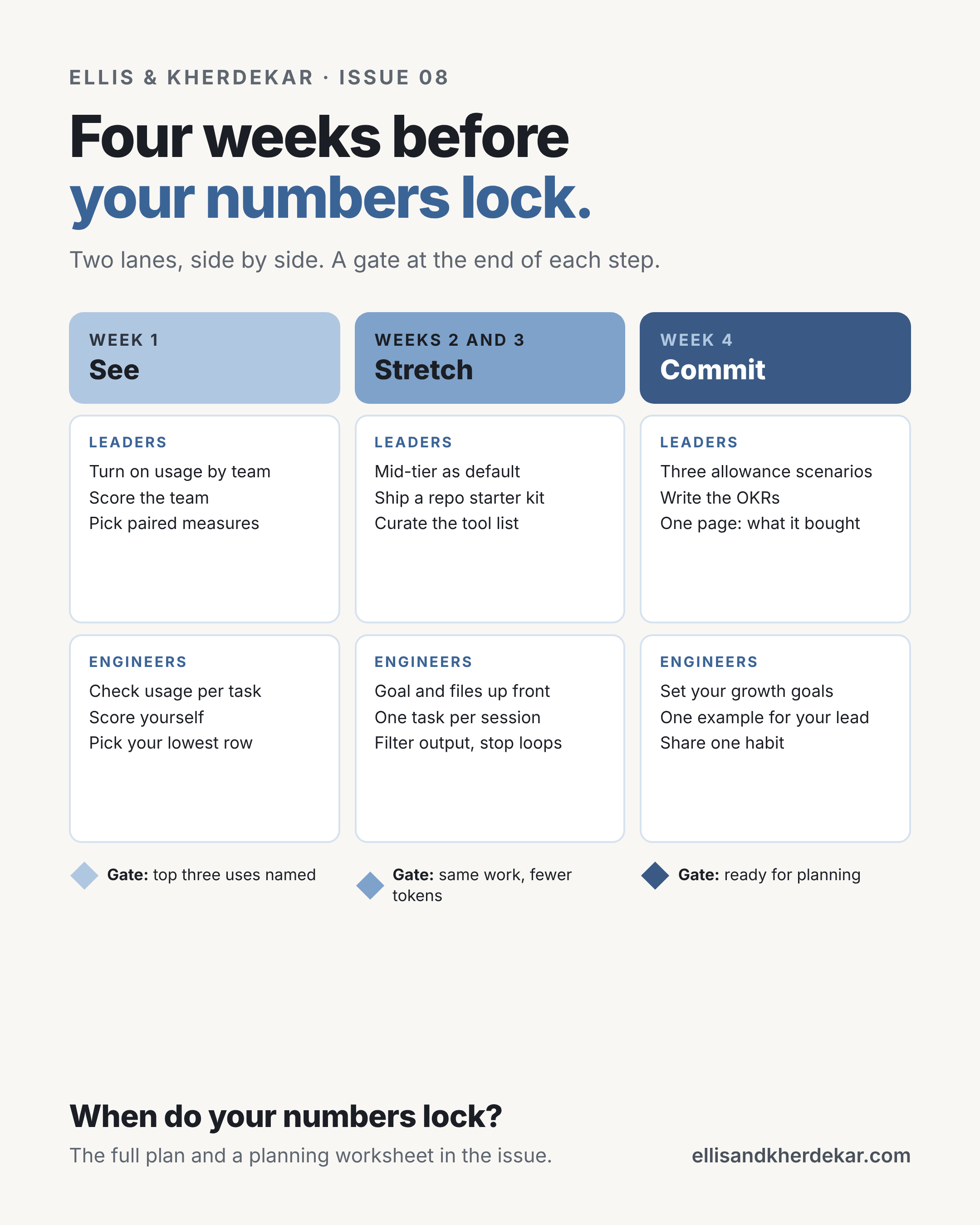
Week 1 · See. Goal: know where your tokens go · Artifact: your scores and the top three uses
Don’t change anything yet. Leaders turn on usage reporting by team if it isn’t on, score the team on the grid, and pick one or two paired measures. Engineers check usage after each task for a week, score themselves, and pick their lowest row. Gate: you can name the top three uses of your tokens. If you can’t, stay here another week.
Weeks 2 and 3 · Stretch. Goal: the same work with fewer tokens · Artifact: a repo starter kit and new habits
Leaders set the mid-tier default, ship a starter kit for repos, and agree on a short tool list. Engineers work on their lowest row first: goal and files in the first message, one task per session, filtered output, and stopping failed loops early. Gate: the same work is getting done with fewer tokens, and delivery has not slipped. If delivery slipped, you cut work instead of waste. Go back to week 1.
Week 4 · Commit. Goal: walk into planning with the trade-offs already made · Artifact: three scenarios, your OKRs and real examples
Leaders build the flat, 30% and 50% scenarios, write the OKRs from the new baseline, and put together one page on what AI use bought this quarter. Engineers set their own growth goals and give their lead one real example with a rough cost and result. Gate: you can answer the four planning questions above without guessing.
If your planning meeting is sooner than four weeks out, do week 1 in a few days and go straight to week 4. A baseline and three scenarios still beat walking in with nothing.
What this means at each career stage
Using the four stages from Issue 05. A tighter allowance asks something different of each one.
Builder · early career · scope: your own tasks
Learn to work well inside an allowance now, while the habits are cheap to build. Goal and files first, the right model, one task per session. Engineers who learn this early will get more done than peers who only learned one way to work.
Stuck signal: you run out before the month does, and you can’t say where it went.
Owner · mid to senior · scope: a problem or a feature
Know roughly what the AI use on your work costs and what it delivered. Flag a spike in your area before anyone asks about it.
Stuck signal: you can’t connect your project’s token use to anything it shipped.
Multiplier · staff and principal · scope: outcomes across teams
Build things that stretch everyone’s tokens, not just yours: the starter kit, shared workflow notes, an output filter other teams can reuse. Help your lead write the defaults.
Stuck signal: you are the heaviest user on the team and the habits stay with you.
Shaper · principal and above, director level · scope: direction across orgs
Set the defaults and the platform, not just the allowance. Decide what gets protected, which tools the org standardizes on, and how it measures what AI delivered. Bring the trade-offs to planning already worked out.
Stuck signal: the plan assumes token use keeps growing with no limit.
If you lead engineers
If an allowance has to come before you finish week 1, that is fine. Say why it is there and when you will look at it again.
Keep incident and production work fully funded at every level.
Judge what the tokens bought, not how many were used, in either direction. Heavy use on work that shipped early can be exactly right.
Three questions for your next 1:1:
What did your AI use buy this month? One example is enough.
Where did tokens go that you would not spend again?
If your allowance were half what it is, what would you stop doing first?
The habit that outlasts the allowance
Allowances will change, and so will the models and the prices. Knowing what your work costs and what it delivered is a habit good teams already have for headcount and cloud spend. Tokens are one more line on that list, and the teams that learn it now will have an easier time with every planning cycle after this one.
If you try one thing this week: score yourself on the grid, then look at your usage after your next three tasks.
Reply with your six scores in this format: Visibility 2, First message 1, Model 2, Context 1, Sessions 1, Outcomes 2. I will share the patterns in a future issue.
If you want to go deeper
Anthropic: Effective context engineering for AI agents: why less context is often better, with just-in-time loading, compaction and sub-agents.
Meta’s thin orchestrator: one agent with all the context started hallucinating in production, so Meta split it into 14 narrow ones.
Inside Uber’s AI and MCP gateways: a consultancy’s write-up of how Uber put gateways in front of models and tools, and in what order.
Unite.AI: Why token costs are breaking CFO budgets: Uber’s budget, Goldman’s routing gateway, and the case for treating tokens like cloud spend. Written by a services firm, so read with that in mind.
Jellyfish: Tokenomics for your 2027 R&D budget: spend per engineer tripled in six months. Jellyfish sells engineering analytics.
TNW: Accenture’s Claude allowance: how one large firm moved to a central allowance with project budgets on top.
If you are heading into planning this month, forward this to whoever you plan the budget with.
The opinions expressed here are our own and do not represent any employer, past or present. Nothing in this publication describes any specific company’s internal systems, data, vendors, teams, metrics, or plans. Sponsored placements and sponsored briefs are clearly labeled.
Till next time,
Ellis & Kherdekar